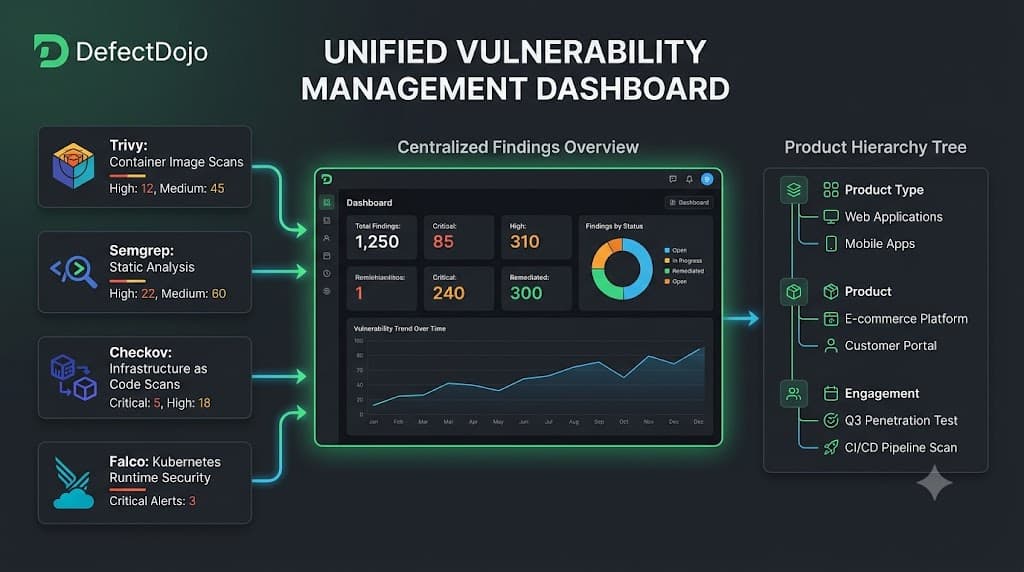
Hari 46: DefectDojo — Vuln Management Dashboard
DefectDojo via Docker Compose — no clone 358MB repo, standalone compose file, 7 containers, port 8088. Single pane of glass untuk semua scan findings. Fase 4 dimulai!
Fase 4 dimulai! Setelah 45 hari hardening (Fase 1-3), sekarang saatnya centralized visibility. DefectDojo = OWASP vulnerability management platform, "single pane of glass" untuk semua scan findings.
Pivot: No Clone Needed
Tutorial minta git clone https://github.com/DefectDojo/django-DefectDojo.git (358MB) + ./dc-build.sh (build from source). Slow network kita sering timeout (n8n 400MB timed out Day 42).
Pivot: Cuma butuh docker-compose.yml file. Download content via curl, create standalone version:
- Hapus
build:sections (images pre-pulled, tidak perlu build) - Hapus
@sha256:...digests (pakai tag saja) - Change port 8080 → 8088 (conflict dengan local API)
- Create dummy
./docker/extra_settings/directory
Hasil: No 358MB clone, no build from source. docker compose up -d = langsung jalan.
7 Containers
| Service | Image | Port | Function |
|---|---|---|---|
| nginx | defectdojo/defectdojo-nginx:latest | 8088 → 8080 | Reverse proxy |
| uwsgi | defectdojo/defectdojo-django:latest | 3031 (internal) | Django app |
| celerybeat | defectdojo/defectdojo-django:latest | — | Task scheduler |
| celeryworker | defectdojo/defectdojo-django:latest | — | Async tasks |
| initializer | defectdojo/defectdojo-django:latest | — | DB migration (run-once) |
| postgres | postgres:18.4-alpine | 5432 (internal) | Database |
| valkey | valkey/valkey:9.1.0-alpine | 6379 (internal) | Cache |
4 Docker images, ~1.3GB total (pre-pulled by user).
Startup Sequence
1. postgres + valkey start (database + cache)
2. initializer → waits for postgres → DB migrations → creates admin user → exits
3. uwsgi + celerybeat + celeryworker start (wait for initializer)
4. nginx starts (reverse proxy to uwsgi)
5. DefectDojo accessible di http://localhost:8088
initializer pattern = run-once container yang exit setelah selesai. Container lain pakai depends_on: condition: service_completed_successfully.
Verify
$ curl http://localhost:8088/
HTTP 302 (redirect to login)

$ curl http://localhost:8088/login
HTTP 200 (login page accessible)

$ docker compose logs initializer | grep "Admin password"
Admin password: [REDACTED — check local Docker logs]
DefectDojo operational!
DefectDojo Hierarchy
Product Type: Fintech
  └── Product: SecureBank API
       └── Engagement: Q3 Security Audit
            └── Test: CI/CD Pipeline Scan
                 └── Findings: (from Trivy, Semgrep, Checkov, Falco)
Day 47 akan upload scan reports via API ke hierarchy ini.
Pelajaran Hari Ini
No clone needed untuk Docker Compose. Tutorial minta clone 358MB, tapi cuma butuh docker-compose.yml. Download via curl, create standalone. Pragmatic DevSecOps = problem solving (lagi, like n8n Day 42).
Pre-built images > build from source. ./dc-build.sh builds from Dockerfile (slow). Pre-built images dari Docker Hub = tinggal pull dan run. Hapus build: sections.
Port conflict resolution. Docker Compose published = host port, target = container port. Change published: 8088 untuk avoid conflict, target: 8080 tetap.
Initializer pattern. Run-once container untuk DB migration + admin user creation. Exit setelah selesai. Container lain wait via condition: service_completed_successfully.
Single pane of glass. DefectDojo centralized semua scan findings — Trivy (SCA), Semgrep (SAST), Checkov (IaC), Falco (runtime). Day 47 akan automate upload via API.
Repo
Semua code dan dokumentasi ada di: https://github.com/stayrelevantid/chalange-devsecops
Kesimpulan
DefectDojo deployed via standalone Docker Compose (no clone, no build). 7 containers Running, accessible di port 8088. Admin password obtained. Setup plan documented (Product Type → Product → Engagement). Fase 4 dimulai! Besok Day 47 — API integration, upload Trivy + Semgrep reports ke DefectDojo.
Diskusi & Komentar
Hari 45: Fase 3 Complete — K8s & Runtime Security
Next ArticleHari 47: DefectDojo API — 7 Scans, 16 Findings Centralized
Artikel Terkait
Hari 20: Terraform + Checkov, 15 Celah IaC Ketahuan
Bikin infrastructure as code pakai Terraform, lalu scan dengan Checkov. Hasilnya 15 celah keamanan ketahuan — S3 tanpa enkripsi, security group terbuka ke dunia.
Hari 22: Pipeline IaC, Dua Scanner Barengan Gagal
Bikin workflow GitHub Actions khusus infrastructure security. Checkov dan Trivy IaC scan Terraform barengan. Hasilnya pipeline MERAH — security gate bekerja!
Hari 22 Bonus: Perbaikan Pipeline Gitleaks yang Merah Diam-diam
Pipeline Gitleaks merah sejak Day 14 karena flag --no-gitignore tidak pernah ada. Gitleaks detect scan git history, bukan working directory. Fix: hapus flag.