Building a Tailscale Subnet Router on AWS with Terraform
From zero to working Tailscale Subnet Router on AWS using Terraform. Access a Private EC2 from your laptop without a public IP. Fully automated!
Today I finished a pretty fun challenge: building a Tailscale Subnet Router on AWS using Terraform. Infrastructure as Code from start to finish.
Let me walk you through it.
What I Built
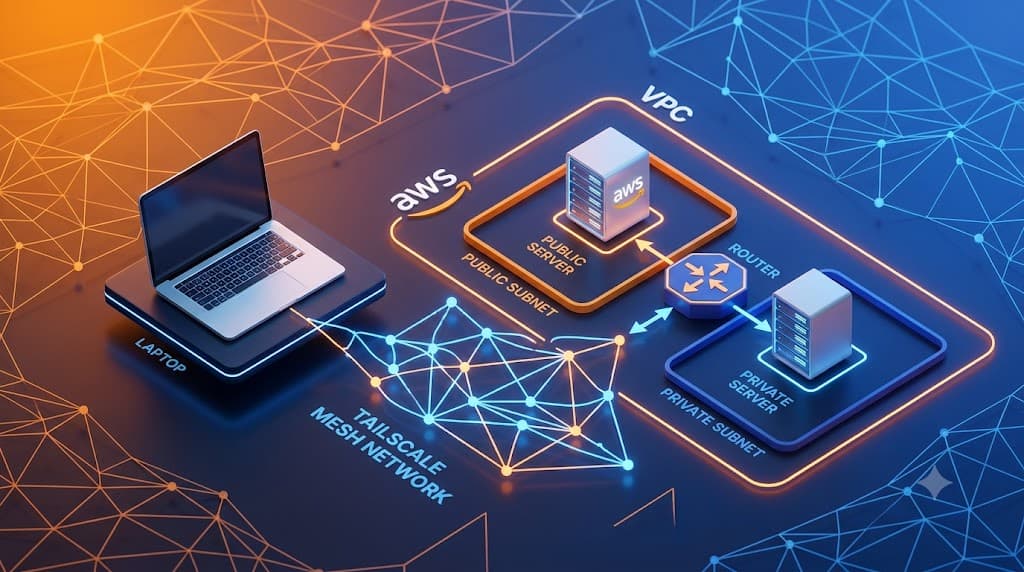
Here's the AWS infrastructure I created:
- VPC with CIDR
10.1.0.0/16 - Public Subnet — where the Tailscale Subnet Router lives, with internet access through an Internet Gateway
- Private Subnet — where the Private EC2 lives, with no internet access at all
- EC2 Subnet Router — Ubuntu, Tailscale installed, IP forwarding enabled, UFW locked down
- EC2 Private — truly private, no public IP, no internet access
And the coolest part: I can access that Private EC2 from my laptop — just through Tailscale, using its internal AWS IP (10.1.x.x). No traditional VPN, no NAT Gateway, no public IP needed.
Architecture
It's actually pretty simple:
My Laptop → Tailscale → EC2 Subnet Router → AWS Private Network → EC2 Private
My laptop and the Private EC2 are connected through Tailscale. The Subnet Router acts as a bridge — it receives traffic from Tailscale and forwards it into the internal AWS network.
Workflow
Everything is written as Terraform code:
- Terraform init — set up the AWS provider
- Terraform apply — create all 13 resources
- Auto-bootstrap — when EC2 boots, it automatically installs Tailscale, enables IP forwarding, and advertises the route
- Approve route in Tailscale Admin Console — so subnet traffic can flow through
- Test connectivity — ping, SSH, nc from laptop to Private EC2
- UFW Lockdown — disable SSH access via public IP, only allow through Tailscale
- Cleanup —
terraform destroy, revoke auth key
Everything is automated except route approval and UFW lockdown.
Results
Everything went smoothly after deployment:
- ✅ Laptop can ping the Private EC2 (10.1.2.54)
- ✅ Laptop can SSH into the Private EC2 without a public IP
- ✅ Laptop can nc/telnet to the Private EC2's ports
- ✅ Subnet Router can access the internet (via IGW)
- ❌ Private EC2 cannot access the internet (as designed)
- ✅ After UFW lockdown, SSH via public IP is blocked, but via Tailscale it still works
Lessons Learned
A few things I picked up from this lab:
Source/Destination Check must be disabled — When an EC2 acts as a subnet router, AWS drops packets that aren't destined for the instance itself by default. You must set
source_dest_check = false.Never hardcode auth keys — Tailscale auth keys are sensitive. Store them in environment variables (
TF_VAR_tailscale_auth_key), not in terraform.tfvars files that might get committed.UFW is more flexible than Security Groups — SGs operate at the AWS level with limited control. UFW inside the VM gives you finer control: "allow SSH only from the Tailscale interface, block from the internet." Perfect for this kind of lab.
Routes need manual approval — Even when Tailscale shows as connected, the subnet route (10.1.0.0/16) still needs to be approved through the Admin Console. It's not automatic.
Ephemeral keys are a lifesaver — When the EC2 is destroyed, the device automatically leaves your Tailnet. No manual device cleanup needed.
Challenges Faced
- Auth key was logged out — Had to regenerate. Lesson: always check
/var/log/user-data.logwhen something goes wrong. - UFW lockdown timing — Wasn't sure when to enable UFW. The answer: do it after all tests pass, so you can still troubleshoot via public IP.
- Test script uses public IP — Once UFW was active,
test-connectivity.shfailed because it connects via public IP. Solution: test manually through the Tailscale IP.
Conclusion
This lab proves that:
You can access an EC2 in a Private Subnet without a public IP, NAT Gateway, or traditional VPN — just using Tailscale Subnet Router.
Infrastructure is fully automated with Terraform. Bootstrapping happens automatically on first boot. And the security model works: after UFW lockdown, public SSH is blocked, but Tailscale access keeps working.
Repository: https://github.com/stayrelevantid/tailscale-aws
Diskusi & Komentar
Hari 49: AI Remediation Node — LLM Auto-Summarize Scanner Findings ke Slack
Next ArticleHari 50: Apa Itu Prowler? Scan Keamanan AWS untuk Pemula
Artikel Terkait
Hari 20: Terraform + Checkov, 15 Celah IaC Ketahuan
Bikin infrastructure as code pakai Terraform, lalu scan dengan Checkov. Hasilnya 15 celah keamanan ketahuan — S3 tanpa enkripsi, security group terbuka ke dunia.
Hari 21: Checkov vs Trivy IaC, Mana Lebih Jago?
Scan Terraform config dengan 2 tools: Checkov dan Trivy IaC. Hasilnya 15 vs 14 findings. Checkov lebih komprehensif, Trivy lebih praktis dengan severity level.
Hari 23: 0 Finding, Pipeline IaC Hijau
Dari 29 IaC findings ke 0 dalam satu hari. Fix KMS policy, S3 encryption, SG egress, dan temukan kalau Trivy ignore comment bukan seperti Checkov.